Menu
Cart 0
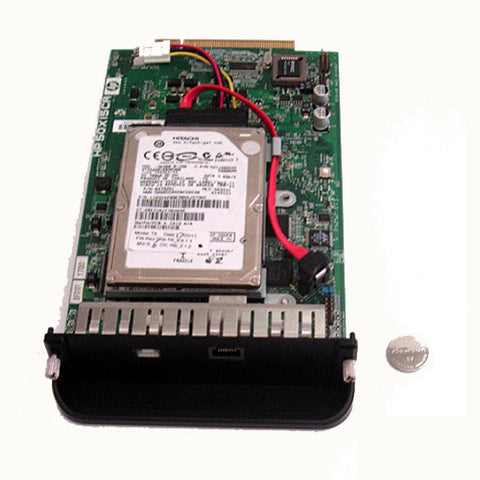
Designjet Z3100 Formatter Board & New 320GB Upgrade Hard Disk Drive HDD Q5669-60175

Designjet Z3100 Formatter Board & New 320GB Upgrade Hard Disk Drive HDD Q5669-60175

  • $ 21285
  • Save $ 23

  • ✓ Same-day shipping from the USA
  • ✓ Free technical support
  • ✓ Veteran-owned US company

Part number: Q5669-60175

SATA-type formatter board with a new 320GB upgrade SATA hard disk for all variants of the HP Designjet Z3100, 24-inch and 44-inch, PostScript and RTL. Replacing it resolves Error 08:10, 59.0 and many 79:04 errors.

At a glance

Fits

Symptoms this fixes

System errors related to the formatter:

What's included

Note: Truly plug and play: no tools or setup needed. With the power cord removed, undo the 2 thumb screws, pull the old formatter straight up, then press the new one down into the connector on the main logic board until it seats.

Note: The hard disk comes with fresh firmware and has never been installed in a printer. A formatter and hard disk take on the ID and password of the first printer they are installed in, so a used formatter or drive from another printer will not work.

Other options

Installation

The replacement procedure can be found in the "removal and installation" section of the service manual: HP Designjet Z2100 / Z3100 / Z3200 service manual.

Returns

30-day return window. See our returns policy for details.


We Also Recommend
Customer Reviews

Based on 7 reviews
71%
(5)
14%
(1)
14%
(1)
0%
(0)
0%
(0)
J
J.F.
Z3100 Formatter Board

Installed easily and setup went without any hiccups. Fixed my problem.

A
Alexandre V.
Works correctly as expected. Successfully transferred initial SATA disk image to a new SSD SATA disk

I bought this SATA disk Formatter Board last december to replace the old IDE disk Formatter Board of my HP Designjet Z3100. The goal was to make a clone of the the Linux partitions of the original SATA disk delivered to a new 256Go 2.5" SSD SATA disk and to use this SSD disk instead on the new SATA disk Formatter Board. Since, the replaced Formatter Board with the SSD SATA disk works fine on my HP Z3100. Thank you.

B
Brian Kainulainen
It works

Formatter didn’t work at first but after a few tries it finally did. Unfortunately it did not fix the problem I am having.

E
Edwin Hopkins
Disappointed!

I bought the 160GB SATA drive rather than the 40GB IDE drive. The formatter is working and the printer is alive again.

But the printer sees the drive as 40GB, not 160GB as it should. I put a question on the page with this item and you gave me a confused answer. (The answer says that I “still have the IDE version of the hard drive” when the whole point of my question is that I now have the SATA version.) I have written two times to get clarification on this and have received no answer. Here, for the THIRD time is my follow up question:

*****

I ordered and paid for the SATA version of the HDD. I do not remember seeing anything about the driving being SATA rather than IDE when I looked at the drive you sent me. I was only looking for the size of the drive: 40gb vs 160gb and I could not find the size.

The original drive was an HiTACHI. (This was the original drive on the original formatter which came with the printer.)

And…I don’t understand your comment “So you have the IDE version of the HDD”. I HAD the IDE version and ordered the SATA version. I assume you sent me the right drive. You suggest that the printer might accept a different brand of SATA hard drive as 160GB. Do you think this is what is going on?

thanks again.

ed

Hi Edwin,
Thank you for your patience. We are sending you a replacement formatter with SATA disk. The 160GB Hitachi drive on this unit should register in your machine as 160GB. Please return the other formatter(s) at your convenience using the pre-paid return label that came with the first unit.

Tim

D
Danny Herzbrunn
Q5669-60175 Designjet Z3100 Formatter

Excellent product I will buy another one soon. Your service is excellent
I would be happy to receive a discount next purchase