Menu
Cart 0
UPDATED Printhead Recovery Kit for Designjet 500, 510, 800 (HP 11 Printhead)

UPDATED Printhead Recovery Kit for Designjet 500, 510, 800 (HP 11 Printhead)

  • $ 5999
  • Save $ 10


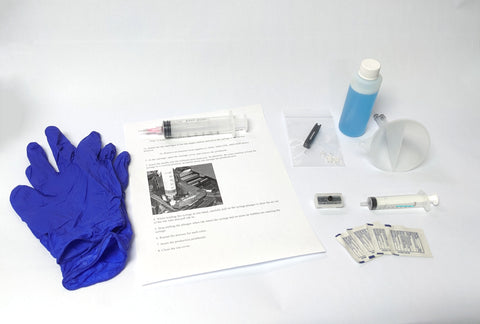
Complete recovery kit for HP 11 printheads


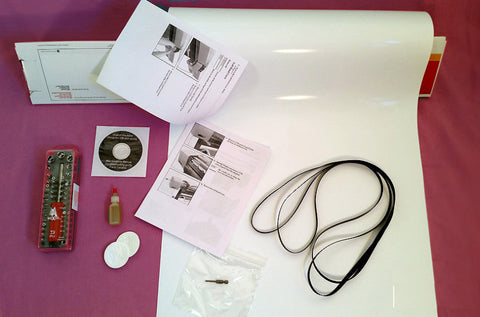
Includes:

-Alcohol wipes for cleaning the printhead electrical contacts

-Funnel, suction cap, dedicated syringe for refilling the printhead

-Nitrile gloves

-Bottle of cleaning solution

-Upgraded purge tool with depth-limiter

-8 Custom printhead seals compatible with all HP 11 printheads

-Seal installation tool

This kit is suitable for recovering 8 printheads. If you plan to do more than that, additional seals and cleaning solution are sold separately. 

DEMONSTRATION VIDEO


A few considerations:

-If a printhead has been starved of ink for a long time, it may have burned itself out by printing with air instead of ink. If this is the case, that printhead will not recover with the installation of new seals.

-Even if a printhead has been starved for only a short period, if the internal ink diaphragm has deflated too much, it will sometimes not allow ink to re-inflate it, and the printhead will remain permanently starved.

-Sometimes the electrical connection between the printhead and the carriage is poor. Make sure to clean off the printhead contacts as well as the contacts on the carriage. If either of those surfaces feels tacky, you've still got cleaning to do.

-If the drop detector sensor is obscured by ink overspray, it will not properly detect the ink droplets, and the printer will not complete print system setup even if the printheads are working with perfect quality. The sensor may require cleaning.


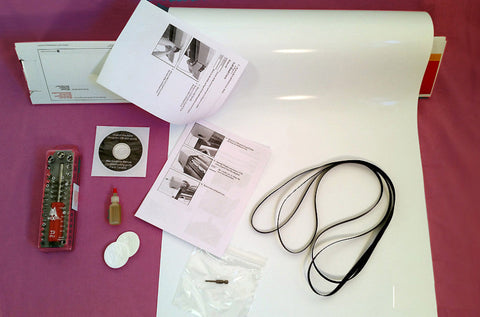
We Also Recommend
Bring Your HP 11 Printhead Back to Life Without the Replacement Cost

If your HP Designjet 500, 510, or 800 is producing poor print quality or throwing printhead errors, don't rush to replace those expensive HP 11 printheads. The LPS Printhead Recovery Kit is a complete, professional-grade solution specifically designed for HP Designjet 500 printer heads, giving you everything needed to clean, reseal, and restore full performance at a fraction of replacement cost.

What's Included in the HP 11 Printhead Recovery Kit

Each kit contains all the tools and supplies needed to perform a full seal replacement and deep clean on up to 8 printheads:

  • Alcohol wipes for cleaning printhead electrical contacts
  • Funnel, suction cap, and dedicated syringe for refilling
  • Nitrile gloves for safe handling
  • Bottle of professional cleaning solution
  • Upgraded purge tool with depth-limiter for controlled, precise cleaning
  • 8 custom printhead seals compatible with HP 11 printheads
  • Seal installation tool

Need to recover more than 8 printheads? Additional seals and cleaning solution are available separately.

Compatible HP Designjet Models

This kit is purpose-built for HP 11 printhead repair for:

  • HP Designjet 500 Printhead
  • HP Designjet 510 Printhead
  • HP Designjet 800 Printhead 

Not sure if this is the right kit for your printer? Contact LPS Computer, and our Designjet specialists will help you find the correct solution.

Before You Begin: Important Printhead Recovery Considerations

Not every HP Designjet 500 printer head can be fully recovered. Before starting, take note of these common issues:

  • Extended ink starvation: A printhead that has been running dry for a prolonged period may have burned out from printing with air; new seals will not restore a thermally damaged printhead.
  • Collapsed ink diaphragm: If the internal diaphragm has deflated too far, ink may not re-inflate it, leaving the printhead permanently starved.
  • Dirty electrical contacts: Tacky or contaminated contacts between the printhead and carriage can cause errors that mimic printhead failure. Clean both contact surfaces thoroughly before drawing any conclusions.
  • Drop detector sensor: Ink overspray can block the drop detector and prevent the printer from completing print system setup, even when printheads are working correctly. Always inspect and clean this sensor as part of your recovery process.

Resources & Technical Support

LPS Computer has supported HP Designjet repair professionals and end users worldwide since 1994. Use these resources to help troubleshoot your printer before and after recovery:

  • Email us for help identifying the right part for your printer
  • Call us to speak with a Designjet specialist

Order your HP 11 Printhead Recovery Kit today and save hundreds over the cost of a replacement. Everything you need for a successful Designjet 800 printhead repair or Designjet 500 recovery, in one complete kit.

Customer Reviews

Based on 11 reviews
82%
(9)
9%
(1)
9%
(1)
0%
(0)
0%
(0)
C
Christopher Curry
Worked Great

Using the syringe and printhead cleaner I managed to clear up a clogged tube. Be careful taking the tubes off at each end, the can nozzles can snap off pretty easy.

S
Stefan
Successfully applied

I had a problem where cyan wouldn't print at all. After removing the printhead, I also got a message that the magenta printhead needed replacing. After using the Printhead Recovery Kit, the Designjet 800 is working again. The air in the system was successfully removed. Thank you for the quick response and the very helpful videos! Greetings from Germany

M
Manfred Rudy
Prompt Delivery

Haven't yet tried out the printhead recovery kit but the idea is unique in trying to solve no longer manufactured heads for my plotter. Ordering process and delivery reliable, thank you.

W
William Hale
A great kit.

My HP 500 is showing a print head warning, and I have three !!! exclamation points flashing on my screen. There is a message, "poor print quality", and it was really bad. Print heads are hard to find so I decided to try the UPDATED Printhead Recovery Kit. The kit comes with everything that you need to recover your printheads. And some little auxiliary printhead seals and a seal installer. The instructions are very clear and lead you through the process, it's not too difficult but it can be messy. Be sure to wear the gloves that are provided. But even though the print quality was improved, the printer won't pass the printhead alignment test and the !!! is still flashing. Maybe I should try to recover the printheads again. There are enough cleaning solution and parts to do two printhead recovery procedures.

J
John Dominguez
No luck with this kit.

This unit did not work on 3 diffrent print heads so now Im trying to find a black HP11 print head with original chip since my printer is dead in the water..